Showing posts with label Apex. Show all posts

Thursday, April 20, 2023

How To Send Set of Ids or Set of Records From Lwc Component To Apex Method

If you're planning to use the set as the one of the parameter of your apex function and the same need to passed from lwc js look at these limitations below.

  • By default @AuraEnabled methods will not accept /allow to use the set of Records as the parameter. 
  • In detail, it's not only support set of Records even if you try to pass of set of Ids, set of strings and set of Records it will not work because it's doesn't support set data type it self.
The work around for this is 

  • The @AuraEnabled method again will support the list as a parameter so you either convert parameter from set to list is one option.
  • You can also try out the convert the set of Records into string in lwc using the Json.stringify() and change the your apex method param to string and inside method you can deserialize the string to set in side the apex method. 
Wednesday, August 10, 2022

Push Topics In Salesforce

We might have heard about the Push topics, If not these are mainly used for generating the events basis on some criteria defined on the SOQL and all these events will be consumed by the all the subscribers of the topic.

Let's assume if you have created some functionality using the Push topics either on VisualForce or in #lightningwebcomponents. It's Working as expected whenever there is change in specified object record etc..

We have refreshed the sandbox from the production and the same functionality is not working in sandbox 🤔. Interesting what is missing here regarding #pushtopics.


The point to be noted here is when we created any #pushtopics either on production or sandbox salesforce by defaults creates an entry in #pushtopic table as a record data not like metadata.

So, obviously when we refreshed the sandbox the records/data will not be created in sandbox from production only metadata will be copied from the production.

If you need these #pushtopic you need to create it again in sandbox manually.

Happy Learning 😊 


Please comment or write us if you have any queries/requirements.

Please like,follow,bookmark,subscribe this site to receive daily updates.


FaceBook Page - I Love Coding. You?


Hope this helps you..Enjoy..!

Wednesday, June 15, 2022

Write A Test Class For Getter and Setter Methods in Salesforce Apex

Please use the below code snippet in you case you have getter and setter methods in your apex class and want to cover up the same lines in test class.

Main Class:

Public class SreeTestCase
{
 public List<SelectOption> caseStatusList 
 {
  get {
	List<SelectOption> options = new List<SelectOption>();
	for( Schema.PicklistEntry f : Case.Status.getDescribe().getPicklistValues()) 
        {
	  options.add(new SelectOption(f.getValue(), f.getLabel()));
	}
	return options;
  }
		set;
 }
}

Test Class:

@isTest 
private class SreeTestCaseTestClass 
{
    static testMethod void testStatusList() 
	{
		SreeTestCase st = new SreeTestCase();
		List<SelectOption> options = new List<SelectOption>();
		options = st.caseStatusList;
	}
}


Please comment or write us if you have any queries/requirements.

Please like,follow,bookmark,subscribe this site to receive daily updates.


FaceBook Page - I Love Coding. You?


Hope this helps you..Enjoy..!

How to Delete (Bulk) Custom Metadata Records in Salesforce.

 Scenario:

You might have used the "Custom Metadata Loader" to perform the bulk insert and bulk update. Sometimes it's might be required to perform the bulk delete also ,but unfortunately this tool doesn't support as of today.

Solution:

So as a workaround we can have apex code snippet which can be used to perform the bulk deletion(in a single run max 200 records) of metadata .Please use the below code snippet for the same.

Source Code:

MetadataService.MetadataPort service = new MetadataService.MetadataPort();

// Set the session id
service.SessionHeader = new MetadataService.SessionHeader_element();
service.SessionHeader.sessionId = UserInfo.getSessionId();

//Add all your metadata records developer name to list
List<String> recordsToDelete = new List<String>();
For(YourMedataDataName__mdt m :[SELECT Developername from YourMedataDataName__mdt Limit 200])
{
	String s = 'YourMedataDataName__mdt.'+m.Developername;
	recordsToDelete.add(s);
}

//Perform the bulk deletion at a time max of 200 records
MetadataService.DeleteResult [] results = new MetadataService.DeleteResult []{};
results = service.deleteMetadata('CustomMetadata', recordsToDelete);

Please comment or write us if you have any queries/requirements.

Please like,follow,bookmark,subscribe this site to receive daily updates.


FaceBook Page - I Love Coding. You?


Hope this helps you..Enjoy..!

Sunday, May 29, 2022

Aura:if isTrue issue in salesforce

If you're facing an issue with Aura:if isTrue while using the And Clause or OR clause we need to know the below points.

According to salesforce documentation And/Or clause only supports two arguments for evaluation.

If you're using more than 2 arguments in And/Or clause by default Salesforce ignores it.


<Aura:if IsTrue ="Or(expression 1,expression 2)">   - - This is valid.

<Aura:if IsTrue ="Or(expression 1,expression 2, expression 3)"> - - This will not work as expected because Salesforce ignores the expression 3 for evaluation. 


Workaround :

If you need to solve this problem simply convert them into simple multiple chain expressions. 

Aura:if IsTrue ="Or(expression 1,expression 2) || expression 3)"> 

Aura:if IsTrue ="Or(expression 1,expression 2) || Or(expression 3, expression 4)"> 


Hope this helps you..Enjoy..!


Please comment or write us if you have any queries/requirements.

Please like,follow,bookmark,subscribe this site to receive daily updates.


Friday, May 27, 2022

How to Link a Child Record Every Time it's Created With An Existing/New Parent Record.

Lets take a use case when a child record has been created it should be automatically link to existing parent record ,in case if parent is not available it should create a parent and link the child record automatically.

The relationship between these objects is "Lookup Relationship" and the identifier to map the child with parent and the identifier when to create a new parent will be discussed below.

Simple use case here is we will have daily time sheet entries of an employee and all these daily time sheet entries should get linked under weekly time sheet entry which is like one entry for one week with 7 daily time sheet under same parent.

We can assume child object as "Daily_Time_Sheet__c" and parent object as "Weekly_Time_Sheet__c". On parent object we will have one field with name as "Parent_User_Week_Start__c(which is an external id) " which is the combination of user id and start date of the week of a given date in "Daily_Time_Sheet__c".The field name in child would be something like "ChildUserIdWeekStrartDate__c".

Source Code:

Trigger DailyTimeSheetTrigger On Daily_Time_Sheet__c(after insert)
{
	List<Weekly_Time_Sheet__c> listWTSToUpsert = new List<Weekly_Time_Sheet__c>();
	List<Daily_Time_Sheet__c> listDTSUpdate = new List<Daily_Time_Sheet__c >();
	Map<String,id> mapHours = new Map<String,id>();
	set<string> setUniqueParent = new set<string>();

	for(Daily_Time_Sheet__c dts:Trigger.new)
	{
		if(dts.ChildUserIdWeekStrartDate__c!=null && dts.Weekly_Time_Sheet__c==null)
		{
			Weekly_Time_Sheet__c wts = new Weekly_Time_Sheet__c();
			wts.Parent_User_Week_Start__c = dts.Chi;
			if(!setUniqueParent.contains(wts.Parent_User_Week_Start__c))
			{
			  listWTSToUpsert.add(wts);
			  setUniqueParent.add(wts.Parent_User_Week_Start__c);
			}
		}
	}
	
	try
	{
		if(!listWTSToUpsert.isEmpty())
		  Database.UpsertResult[] wtsUpsertResult = Database.upsert(listWTSToUpsert,Weekly_Time_Sheet__c.Parent_User_Week_Start__c,false);
	  
		for(Weekly_Time_Sheet__c ws:listWTSToUpsert)
		{
			mapHours.put(ws.Parent_User_Week_Start__c,ws.id);
		}


		for(Daily_Time_Sheet__c dts:[SeLEcT id ,ChildUserIdWeekStrartDate__c,Weekly_Time_Sheet__c FROM Daily_Time_Sheet__c WHERE ID IN: Trigger.new])
		{
			if(dts.ChildUserIdWeekStrartDate__c!=null && dts.Weekly_Time_Sheet__c==null)
			{
				if(mapHours.containsKey(bh.ChildUserIdWeekStrartDate__c))
				{
					bh.Weekly_Time_Sheet__c = mapHours.get(guid);
					listDTSUpdate.add(bh);
				}
			}
		}
		
		if(!listDTSUpdate.isEmpty())
			Database.SaveResult[] wbhUpsertResult2 = Database.update(listDTSUpdate,false);
	}
	catch(exception e)
	{
		system.debug('exception ..'+e);
	}
}

Hope this helps you..Enjoy..!


Please comment or write us if you have any queries/requirements.

Please like,follow,bookmark,subscribe this site to receive daily updates.


Wednesday, May 25, 2022

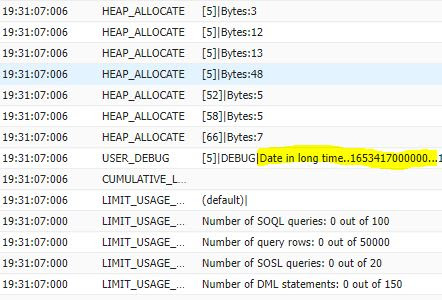
Convert Date into Long Time String in Salesforce Apex

  • First convert the date feild into the datetime field format
  • The getTime() in the datetime class will returns the number of milliseconds of a given date starting from  January 1, 1970, 00:00:00 GMT.

Source Code:

Date todayDate = Date.today();
DateTime todayDateTime = DateTime.newInstance(todayDate.year(),todayDate.month(),todayDate.day());
string longTime =String.valueOf(todayDateTime.getTime());
System.debug('Date in long time string..'+logTime);


Hope this helps you..Enjoy..!


Please comment or write us if you have any queries/requirements.

Please like,follow,bookmark,subscribe this site to receive daily updates.


How to get the start date of the week for the given date in Salesforce

 If your trying to know the starting date of the week for the given date in salesforce please use the below 2 formats.


Using the Formula Fields:

The return type of the formula is date.

(Yourdatefield__c- MOD(Yourdatefield__c- DATE(1900, 1, 7), 7))

Using the Apex:

In case of apex we can use the salesforce in built date function called toStartofWeek() which returns the start date of week basis on the user locale.

  • Sunday will be treated as US locale
  • Monday in case of European locale

Date startWeek = Yourdatefield__c.toStartofWeek();

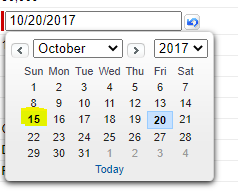
In my case given date is 20th Friday and start of the week will returns as 15th on Sunday


Please comment or write us if you have any queries/requirements.

Please like,follow,bookmark,subscribe this site to receive daily updates.


Tuesday, February 18, 2020

How To Open (Url Format) Visual Force Page in Lightning Experience

If you want to open/preview the visual force page in salesforce lightning experience,do you know  how to construct the final url?if not ,this post will help you with the necessary details.

Url format in Classic:

   BaseUrl + '/apex/' + Your PageName +'?AnyQueryParams=xxx'

Url format in Lightning :

  BaseUrl + '/one/one.app#/alohaRedirect/apex/' + Your PageName +'?AnyQueryParams=xxx'

Let take an example your page name is call and your passing the mobile as query param.The complete your will be like below.
https://srinivas4sfdc--dev.lightning.force.com/one/one.app#/alohaRedirect/apex/Call?mobile=8884876772


Output:


Please comment or write us if you have any queries/requirements.

Please like,follow,bookmark,subscribe this site to receive daily updates.


Hope this helps you..Enjoy..!

Thursday, January 30, 2020

After Update Trigger In Salesforce Apex

Trigger Scenario:

Lets take a sample use case when an Opportunity stage has been changed to Closed-Won ,I want to create a new Invoice(custom object) record with below data mapping.
  • Invoice Opportunity - Same Opportunity where Stage has been modified.
  • Invoice Account - Account Related To This Opportunity.
  • Invoice Total Quantity - The sum the quantity of all opportunity line items(opportunity products) related to the same Opportunity.


The relationship between all these objects as below


Source Code:


trigger OpportunityTrigger on Opportunity (after update)
{
    if(Trigger.isAfter && Trigger.isUpdate)
 {
  OpportunityTriggerHandler.opportunityAfterUpdate(Trigger.new,Trigger.oldMap)
 }
}


Public Class OpportunityTriggerHandler
{
  public static void opportunityAfterUpdate(List<Opportunity> TriggerNew,Map<Id,Opportunity> TriggerOldMap)
  {
   Set<id> setOppIds = new Set<id>();
   Map<Id,Decimal> mapOppIdtoSumOfLineitems = new Map<Id,Decimal>();
   for(Opportunity opty:TriggerNew)
   {
    if('Closed Won'.equalsIgnoreCase(opty.StageName) && opty.StageName!=TriggerOldMap.get(opty.Id).StageName)
    {
     setOppIds.add(opty.id);
    }
   }
   
   if(!setOppIds.isEmpty())
   {
    List<Invoice__c> listInvocesToInsert = new List<Invoice__c>();
    for(Aggregateresult agr:[SELECT sum(quantity) qunty,Opportunityid FROM Opportunitylineitem WHERE Opportunityid IN:setOppIds GROUP BY Opportunityid])
    {
                mapOppIdtoSumOfLineitems.put((id)agr.get('Opportunityid'),(decimal)agr.get('qunty'));
    }
    
    for(Opportunity op:TriggerNew)
    {
     if('Closed Won'.equalsIgnoreCase(op.StageName) && op.StageName!=TriggerOldMap.get(op.Id).StageName && mapOppIdtoSumOfLineitems.containsKey(op.id)
     {
      Invoice__c inv = new Invoice__c();
      inv.name = 'Trigger-'+op.Name;
      inv.ParentAccount__c=op.Accountid;
      inv.ParentOpportunity__c=op.id;
      inv.Discount__c=mapOppIdtoSumOfLineitems.get(op.id);
      listInvocesToInsert.add(inv);
     }
   }
   if(!listInvocesToInsert.isEmpty())
    Database.insert(listInvocesToInsert,false);
   }
  }
}

Please comment or write us if you have any queries/requirements.

Please like,follow,bookmark,subscribe this site to receive daily updates.


Hope this helps you..Enjoy..!


Sunday, January 26, 2020

Custom Permissions Are Not Working In Apex

Lets assume you have created a custom permission and it's assigned to user through permission sets.

Now when your referring the same value in apex for the assigned user it's still giving a false instead of the true value .

This could be happening because of the  Session Activation Required setting is enabled on the permission set level.

Please disable this and try it out probably it should work.


Please comment or write us if you have any queries/requirements.

Please like,follow,bookmark,subscribe this site to receive daily updates.


Hope this helps you..Enjoy..!

How To Access Custom Permission in Apex

  • Let's assume you have created a custom permission and it's been assigned to permission set or profiles.
  • Now we can refer the same custom permission in apex to check whether it's enabled for logged in user or not.
  • We use will the checkPermission() method from the FeatureManagement class for the same.

Boolean enabSet = System.FeatureManagement.checkPermission('Custom Permission APi Name');
System.debug('enabSet..'+enabSet);

Example:
Boolean enabSet = System.FeatureManagement.checkPermission('SreeTest');
System.debug('enabSet..'+enabSet);

Please comment or write us if you have any queries/requirements.

Please like,follow,bookmark,subscribe this site to receive daily updates.


Hope this helps you..Enjoy..!

Wednesday, January 8, 2020

How To Populate A Map With List or Set (Where Collections As a Value) in Salesforce

As a developer most of the times we will be working on collections.One of the most common used collection in salesforce is maps.

Creating a simple maps(value as a string,integer,object etc..) is very easy
  • Map<String,String>
  • Map<String,Integer>
  • Map<key,objects>
The real picture comes into scenario when we want to build some complex maps(where value of a map it self again a collection like list,set etc) 
  • Map<String,list<Account>>
  • Map<integer,set<integer>>
  • Map<AccountId,list<Conatct>>
Most common mistakes that we do while building this complex maps are
  • Old value gets overrides by new values.
  • When your in loop you map always ends up with just holding the last record in list/set.
  • Didn't checking whether value is already is exist or not.
Scenario:

Let take a take I want to create a map which will takes case status as key and it's value is all the cases comes under the same status.

Map<String,List<Case>> mapStatusToCases = new Map<String,List<Case>>()

for( Case cs: [SELECT id,Status,CaseNumber FROM Case limit 20])
{
 //Check whether with same status any record is already is added to map or not
 
 if(mapStatusToCases.containsKey(cs.Status)) 
 {
    // If you directly put this case into the map it will overrides all the existing cases,
   // which is not correct.So get all the existing records and store it list/set.
  List<Case> existingCase = mapStatusToCases.get(cs.Status);
  //add this new record to existing list  
  existingCase.add(cs);
  // now put the same status into the map with all latest case records(existing+new),
  // because key is same so it will overrides existing values with this latest list
  mapStatusToCases.put(cs.Status,existingCase); 
 }
 
 else // this executes if the status is not there in map(it means coming first time)
 {
     //prepare variable of map value type
  List<case> lstNewCases = new List<Case>();
  // adding a new record
  lstNewCases.add(cs); 
  // add the new status as a key and case as a value into map
  mapStatusToCases.put(cs.Status,lstNewCases); 
 }
}

System.debug('All Key Set...'+mapStatusToCases.keySet());
System.debug('All Values in Map...'+mapStatusToCases.values());
System.debug('Complete Map Details...'+mapStatusToCases);

For better understanding in above I have written each statement in a separate line. The same code can also be written in an optimized way as shown below.Both are valid and same.


Map<String,List<Case>> mapStatusToCases = new Map<String,List<Case>>()

for( Case cs: [SELECT id,Status,CaseNumber FROM Case limit 20])
{
 //Check whether with same status any record is already is added to map or not
 
 if(mapStatusToCases.containsKey(cs.Status)) 
 {
  //this statement mapStatusToCases.get(cs.Status) will returns the list
  //So,I'm adding new record to existing list directly
  mapStatusToCases.get(cs.Status).add(cs); 
 }
 
 else // this executes if the status is not there in map(it means coming first time)
 {
     //Delcared a new list and directly adding a new record to that
  mapStatusToCases.put(cs.Status,new List<Case>{cs}); 
 }
}

System.debug('All Key Set...'+mapStatusToCases.keySet());
System.debug('All Values in Map...'+mapStatusToCases.values());
System.debug('Complete Map Details...'+mapStatusToCases);

OutPut:


Please watch this space more useful stuff.

Please follow,bookmark,subscribe this site to receive daily updates.

Facebook - https://www.facebook.com/ILoveCodingYou/?ref=bookmarks


Hope this helps you..Enjoy..!