Wednesday, May 25, 2022

Convert Date into Long Time String in Salesforce Apex

  • First convert the date feild into the datetime field format
  • The getTime() in the datetime class will returns the number of milliseconds of a given date starting from  January 1, 1970, 00:00:00 GMT.

Source Code:

Date todayDate = Date.today();
DateTime todayDateTime = DateTime.newInstance(todayDate.year(),todayDate.month(),todayDate.day());
string longTime =String.valueOf(todayDateTime.getTime());
System.debug('Date in long time string..'+logTime);
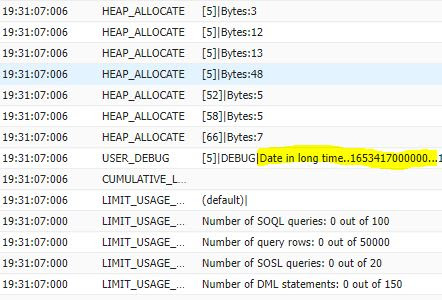


Hope this helps you..Enjoy..!


Please comment or write us if you have any queries/requirements.

Please like,follow,bookmark,subscribe this site to receive daily updates.


How to get the start date of the week for the given date in Salesforce

 If your trying to know the starting date of the week for the given date in salesforce please use the below 2 formats.


Using the Formula Fields:

The return type of the formula is date.

(Yourdatefield__c- MOD(Yourdatefield__c- DATE(1900, 1, 7), 7))

Using the Apex:

In case of apex we can use the salesforce in built date function called toStartofWeek() which returns the start date of week basis on the user locale.

  • Sunday will be treated as US locale
  • Monday in case of European locale

Date startWeek = Yourdatefield__c.toStartofWeek();

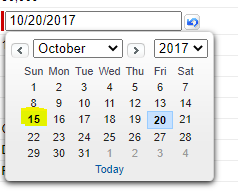
In my case given date is 20th Friday and start of the week will returns as 15th on Sunday


Please comment or write us if you have any queries/requirements.

Please like,follow,bookmark,subscribe this site to receive daily updates.