Showing posts with label Configuration. Show all posts

Tuesday, October 17, 2023

Issue - Quick Text Is Not Showing Under The Selected Folder After It's Created In Salesforce


QuickText : As name suggest it's used to configure the commonly used sentences or streamline the agents responses in chat, email and phone call to speed up the closure of the case etc. These are similar to email templates only but can be used across the multiple channels.

Ideally while creating these Quicktext we will be selecting the folder where this should go and save so that we can provide the access to these QuickText for an user using the folder only.

We have identified one issue where even after the desired folder selected while creating the new Quicktext but these Quicktext not showing under selected folder it's going under all folder/all QuickText .

So ,quick fix for this to update the folder for all these Quicktext can be done either using the Apex code snippet or using the SOQL.

Go to folder where you want to place the QuickText and copy the folder id from the url .

Just run the query on QuickText object to get the all the templates where FolderId is blank or you can just query your QuickText by using the Name.


  List<QuickText> lisQtextToUpdate = new List<QuickText>();
  for (QuickText qt :[SELECT Id,Name,FolderId From QuickText WHERE FolderId= Null])
  {
    qt.FolderId = <Your Folder Id>;
    lisQtextToUpdate.add(qt);
  }

  if (!lisQtextToUpdate.isEmpty())
     update lisQtextToUpdate;


Happy Learning 😊


 Please comment or write us if you have any queries/requirements.


Please like,follow,bookmark,subscribe this site to receive daily updates.


FaceBook Page - I Love Coding. You?


Hope this helps you..Enjoy..!


Monday, October 16, 2023

How To Check The Given Email Field Value Is Present In The List Of Email Ids In Salesforce Workflow, Formula and Flows

The use case here is I want to check whether case email is available given in the list of email ids or not? If it's present in the list it will return true else it will return false.


IF(

   FIND(Your Email Filed,'test@gmail.com,man.6233@gmail.com,hello@haptik.co,
pk.kk@gmail.com,support@jugnoo.in,msj@gmail.com,mailer-daemon@amazonses.com,
sales@kks.com,l.dyj@licindia.com') > 0,TRUE,FALSE
 
 )

Example:

IF(

   FIND(SuppliedEMail,'test@gmail.com,man.6233@gmail.com,hello@haptik.co,
pk.kk@gmail.com,support@jugnoo.in,msj@gmail.com,mailer-daemon@amazonses.com,
sales@kks.com,l.dyj@licindia.com') > 0,TRUE,FALSE
 
 )


Saturday, July 16, 2022

How To Stop Workflow Rules and Outbound Messages in Sandbox Automatically

We have couple of outbound messages linked under the workflow rules and all these outbound message will send some of custom objects data and standard objects data to external systems everytime any kind of DML operation happens on these objects. 

Everything got set up and working as expected. But recently we have come across a situation where all the outbound messages are pushing data from sandboxes to same external systems assuming that we forgot to disable these workflow rules in sandbox before we activate it and somehow we missed to change the outbound messages end point from production to sandbox.

Because of all these things the sandbox data got messed up with the production data. So, we started exploring the options how can we stop all these Workflow rules automatically in sandbox or can we change the endpoint from production to stage automatically after refreshing the sandbox.

As a solution we come across multiple options but as a quick fix we have chosen to use the below solution.


1. Identify the environment like sandbox or production.

  • Use the username to identify this assuming we will add sandbox name in the end of username but in production we will not have any name after email Id.
  • Use the SOQL to identify the environment 
2. Assuming we have decided to move with username flow create a formula field on User Object as Checkbox. 

3. Assume formula field name as "isProduction__c" and this will get updated to true in case of if user in production env and else false in sandbox.

4. Use this field in all your workflow rule by adding CurrentUser under that select isProduction__c field.

Now all your workflow rules will get evaluated to true if the logged in user in production else the rule will not get satisfied so your Workflow rules will not get fired in sandbox. 

With this approach we don't need to worry about the disabling the workflow rules and changing the outbound messages endpoints to stage. We can use other options to as well but we thought this is simple and easy to implement for Admins too...

Happy Learning 😊 

Please comment or write us if you have any queries/requirements.

Please like,follow,bookmark,subscribe this site to receive daily updates.


FaceBook Page - I Love Coding. You?


Hope this helps you..Enjoy..!

Wednesday, May 25, 2022

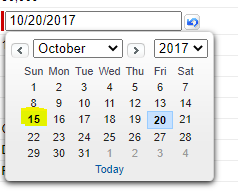
How to get the start date of the week for the given date in Salesforce

 If your trying to know the starting date of the week for the given date in salesforce please use the below 2 formats.


Using the Formula Fields:

The return type of the formula is date.

(Yourdatefield__c- MOD(Yourdatefield__c- DATE(1900, 1, 7), 7))

Using the Apex:

In case of apex we can use the salesforce in built date function called toStartofWeek() which returns the start date of week basis on the user locale.

  • Sunday will be treated as US locale
  • Monday in case of European locale

Date startWeek = Yourdatefield__c.toStartofWeek();

In my case given date is 20th Friday and start of the week will returns as 15th on Sunday


Please comment or write us if you have any queries/requirements.

Please like,follow,bookmark,subscribe this site to receive daily updates.


Tuesday, May 24, 2022

Salesforce Data Loader Log4j Vulnerability or Data Loader Installation Issues

Salesforce Data loader is a tool which will be used to insert, update, delete, export and hard delete salesforce objects data. As we know in recent times Log4j vulnerability caused a lot of issues on multiple systems.

Basically to run the data loader we must have JDK setup on your systems so a part of the this vulnerability data loader has started facing some issues. So, Salesforce has suggested to delete the existing data loader and to set up this again after downloading the latest version from salesforce setup which is not have these issues. 

While setting up this i have come across some of the java/jdk related issues and it's been sorted out with the help of the articles mentioned below. If anyone of facing same issue related to java/jdk setup you can refer the below posts for step by step process.

How to Install Azul Zulu OpenJDK Version 11 on Windows for data loader?

Install Azul Zulu on Windows


Please comment or write us if you have any queries/requirements.

Please like,follow,bookmark,subscribe this site to receive daily updates.


Hope this helps you..Enjoy..!


Thursday, May 19, 2022

RecordType Translations Are Not Working in Salesforce

 In case of these scenarios please cross check the below things.

  • Whether logged in user county and language are properly settled or not.
  • Whether translations are mapped correctly for the logged in user language or not.
  • Check whether record type name and record type api name both are same or not.
  • If both are not same and if the data comes from the SOQL please try to use the toLabel(RecordType.Name) in SOQL. Whenever we are making a query returns the api name instated of record type label so the translations might break.

Please comment or write us if you have any queries/requirements.

Please like,follow,bookmark,subscribe this site to receive daily updates.


Hope this helps you..Enjoy..!

Tuesday, April 26, 2022

How to Stop Email-to-Case: Error(s) encountered while processing Error Emails

 In previous post we have clearly discussed about all the scenarios why all these emails comes .In this post we will be discussing how to stop receiving these emails from salesforce.

Please follow below steps to update the config.

  1. Go to Service Setup
  2. Search Process Automation -->Support Settings
  3. Click on Edit of Support Settings
  4. Find the "Automated Case User".


  • If it's selected as "System" 
  • Check the "Email for Automated Case User Notifications" field value might be our yours
Now if you want the keep the "Automated Case User " as System just keep that same and modify the email field of  "Email for Automated Case User Notifications" field with emailid of whom you want to send all these emails.

Even if you want to change the "Automated Case User " from System to User in this case the "Email for Automated Case User Notifications" will be marked as grayed out and all emails go to the selected user email address automatically.


Please comment or write us if you have any queries/requirements.

Please like,follow,bookmark,subscribe this site to receive daily updates.


Hope this helps you..Enjoy..!

Email-to-Case: Error(s) encountered while processing

Have you ever started receiving an email from Salesforce Support email ,the from address would be support@salesforce.com <support@salesforce.com> whenever there is an error while creating an email-to-case in salesforce.

One of the sample error email looks like as below


If your worrying why it's been been to you, the simple reason is that before we setup the email-to-case/support application we need to configure the Support Process in salesforce first.

If in this support process if your user has been configured as "Automated Case User" or Your email has configured as the "Email for Automated case user notifications " you will be get notified all the kind of system errors occurs on email-to-case process.


Please comment or write us if you have any queries/requirements.

Please like,follow,bookmark,subscribe this site to receive daily updates.


Hope this helps you..Enjoy..!